Driving Demeanor with a local LLM
Demeanor exposes its tooling through MCP, so any MCP-compliant client can drive obfuscation, audits, the cooperative-decision loop, and crash-trace decoding. This guide walks through one full local stack: Ollama hosting an open-source model on your GPU, Cline as the VSCode bridge, Demeanor’s MCP server underneath. No Anthropic subscription, no data leaving the machine.
The short version. Install Ollama, pull a tool-capable 32B model (Qwen 3 or Qwen 2.5 Coder), install the Cline VSCode extension, set Cline’s provider to Ollama, then register demeanor --mcp as an MCP server in Cline’s config with your Enterprise license key in the env block. Paste a structured prompt and the local model drives the whole workflow. Caveats: 32B local models need tighter prompts than Claude, and the MCP surface is Enterprise-only.
What this gives you
The conversational Demeanor workflow that Claude Code customers run today — pre-obfuscation audit, cooperative-decision loop, dry-run obfuscation, real obfuscation, crash-trace decoding, ad-hoc rule authoring — available entirely on your own hardware. Your source code, your crash traces, your reports, and your AI assistant all stay on the local machine.
- No vendor lock-in. MCP is an open protocol. Demeanor publishes the same MCP surface for every compliant client.
- No AI subscription required. Ollama and Cline are free; the model weights are open-source.
- No data leaves the box. Inference, tool calls, and file reads all happen locally. Useful for regulated environments, customer crash data with confidentiality constraints, and projects under NDA.
- Same Demeanor binary. The MCP server you configure here is the same
demeanor --mcpentry point Claude Code uses. No special build, no separate install.
Prerequisites
| Requirement | How to obtain |
|---|---|
| Windows or Linux with a CUDA GPU | 20 GB VRAM minimum; 32 GB recommended for the 32B-class models that drive the workflow reliably |
| VSCode | code.visualstudio.com |
| Demeanor installed | dotnet tool install -g WiseOwl.Demeanor |
| Demeanor Enterprise license | The MCP surface is Enterprise-only. Pricing. |
| A built .NET assembly | Standard dotnet build -c Release output is fine for the worked example |
Step 1 — Install Ollama
Ollama is the local model runtime. Install from ollama.com/download and verify it’s reachable:
ollama --versionBy default Ollama listens on http://localhost:11434. Cline talks to it there.
Step 2 — Pull a tool-capable model
The model must be strong at function-calling, because the entire workflow is a sequence of MCP tool calls with structured JSON arguments. Two recommendations:
# Primary recommendation — newest of the strong open tool-callers
ollama pull qwen3:32b                  # ~20 GB at Q4

# Solid alternative tuned for code workflows
ollama pull qwen2.5-coder:32b          # ~19 GB at Q4
Both fit comfortably on a 24 GB+ card. Smaller models (14B and below) can drive simple flows but stumble on the full 20-tool surface; pick one of the 32B options unless you have a hard VRAM constraint.
Smoke test the model is reachable:
ollama run qwen3:32b "Say hello"Create a customized variant with extended context and tool-calling defaults
Ollama’s default qwen3:32b ships with a 32K context window and a high temperature. Both work, but neither is ideal for the Demeanor workflow:
- 32K is tight. Demeanor’s 20 tool schemas, Cline’s system prompt, and the rename-map reports collectively burn most of a 32K window. The model starts dropping context partway through the walkthrough — you see it as imprecise rename tables or skipped steps.
- High temperature breaks structured tool calls. Above ~0.3, the model occasionally emits malformed JSON for tool arguments. Cline rejects those and the model retries, but each misfire adds latency.
0.1is the reliable setting. - Cline doesn’t expose temperature in its Ollama provider UI. The setting has to live with the model itself.
Solution: a one-file Modelfile that creates a customized tag reusing the same weights with different defaults baked in. Doesn’t re-download the model:
# Write a Modelfile to %TEMP%
@'
FROM qwen3:32b
PARAMETER num_ctx 65536
PARAMETER temperature 0.1
PARAMETER top_p 0.8
'@ | Set-Content -Encoding ascii $env:TEMP\Modelfile-qwen3-32b-65k

# Build the tag (reuses the underlying qwen3:32b weight blobs;
# disk usage barely budges)
ollama create qwen3:32b-65k -f $env:TEMP\Modelfile-qwen3-32b-65k

# Verify the parameters baked in
ollama show qwen3:32b-65k --modelfile | Select-String "PARAMETER"
You should see three lines:
PARAMETER num_ctx 65536
PARAMETER temperature 0.1
PARAMETER top_p 0.8
Then in Cline’s API Configuration panel use qwen3:32b-65k as the Model ID and 65536 as the Model Context Window. Cline’s context-usage meter (the bar at the bottom of the chat panel) will report <used> / 65.5k instead of / 32.8k — comfortable headroom for the Demeanor workflow with the full 20-tool schema in scope plus both rename-map reports read in full.
VRAM cost
KV-cache memory scales linearly with context. Doubling num_ctx adds roughly +4 GB of VRAM for a 32B model at typical attention layouts. A 32 GB card (RTX 5090, RTX 6000) has plenty of headroom; on a 24 GB card the model + 64K context fits but with less margin for other processes.
Why these specific parameters
num_ctx 65536 — doubles Ollama’s 32K default. Qwen 3 supports up to 131,072 tokens but benchmark accuracy degrades above ~64K for most tasks; 64K is the sweet spot for this workflow. temperature 0.1 — tool-call JSON requires deterministic generation; anything above 0.3 risks malformed structured output. top_p 0.8 — tightens nucleus sampling, complementing low temperature; default is 0.9.
Step 3 — Install Cline
Cline is an MCP-compliant VSCode extension that bridges your local model to Demeanor’s tools. Other MCP-compliant clients work the same way against the same server — this guide uses Cline as one worked example because the configuration is straightforward and the extension is mature. In VSCode:
- Extensions sidebar (
Ctrl+Shift+X). - Search
Cline. The publisher issaoudrizwan. - Install. A robot icon appears in the activity bar.
Step 4 — Point Cline at Ollama
Open the Cline panel (robot icon) and click the settings gear at the top. Configure:
| Setting | Value |
|---|---|
| API Provider | Ollama |
| Use custom base URL | checked |
| Base URL | http://localhost:11434 |
| Model | qwen3:32b-65k — the customized variant you created in Step 2 |
| Model Context Window | 65536 |
| Request Timeout (ms) | 120000 — bumped from the 30000 default to absorb the 30–60-second model load on the first tool call |
Cline’s Ollama provider UI does not expose a temperature field; that’s why Step 2 bakes temperature into the custom Modelfile. With qwen3:32b-65k as the Model ID, every request inherits temperature 0.1 automatically.
Step 5 — Register Demeanor’s MCP server in Cline
This is the step that needs care. Two Windows-specific details determine whether the connection succeeds.
Open Cline’s MCP config
The file lives at:
%APPDATA%\Code\User\globalStorage\saoudrizwan.claude-dev\settings\cline_mcp_settings.jsonOr click the MCP Servers icon at the top of the Cline panel, then Edit Configuration.
The exact JSON to paste
{
  "mcpServers": {
    "demeanor": {
      "type": "stdio",
      "command": "cmd.exe",
      "args": ["/c", "demeanor", "--mcp", "--no-bootstrap"],
      "env": {
        "DEMEANOR_LICENSE": "your license key here"
      },
      "autoApprove": [
        "open_project", "close_project", "demeanor_help",
        "inspect_summary", "inspect_types", "inspect_methods",
        "inspect_fields", "inspect_properties", "inspect_attributes",
        "inspect_find", "inspect_diff", "inspect_query",
        "demeanor_audit", "demeanor_check_obfuscated",
        "demeanor_validate_exclusions",
        "demeanor_list_rules", "demeanor_explain_rule",
        "demeanor_dry_run_rule", "demeanor_why_protected",
        "demeanor_propose_rule", "demeanor_promote_rule",
        "demeanor_check_decisions", "demeanor_resolve_decision",
        "demeanor_query_report", "demeanor_deobfuscate_stacktrace",
        "demeanor_report_pattern", "demeanor_list_patterns",
        "demeanor_report_pattern_upstream",
        "demeanor_obfuscate"
      ]
    }
  }
}
Save the file. Cline reloads automatically.
Why cmd.exe /c
On Windows, dotnet tool install -g creates a .cmd shim for global tools. Node-based extensions like Cline call child_process.spawn without a shell, and Node on Windows only auto-appends .exe when searching PATH — never .cmd. Wrapping the invocation in cmd.exe /c hands the lookup to the Windows command shell, which resolves .cmd shims correctly.
Why autoApprove
By default, Cline pauses for human approval before every MCP tool call. For a six-step walkthrough that’s ~5 prompts of friction; for the longer rule-engine workflows it stacks up faster. The autoApprove array tells Cline to skip the prompt for the listed tool names. All 29 tools above are safe to auto-approve for the workflows this page documents — none of them are destructive (the obfuscation tool only writes to a directory you pass in; the deobfuscation tool is read-only; the inspect tools are read-only). Adding the array up front saves ~5 minutes of approval-clicking on a full walkthrough.
You can also populate this array interactively by clicking the auto-approve checkbox next to each tool in Cline’s MCP Servers panel; either path produces the same array in the JSON file.
Alternative for source-checkout users
If you’ve checked out Demeanor’s source and want Cline to use your local Debug build (so rebuilds of the source flow into Cline without reinstalling the global tool), point command directly at the built .exe and drop the cmd.exe wrapper:
"command": "C:\\path\\to\\Demeanor\\src\\Demeanor.CLI\\bin\\Debug\\net10.0\\demeanor.exe",
"args": ["--mcp", "--no-bootstrap"],
Direct .exe paths bypass the .cmd-shim issue entirely. This form is convenient for Demeanor developers but unnecessary for customers using the published nuget tool.
Why the env block
MCP clients deliberately spawn server processes with a stripped environment for security: the official MCP TypeScript SDK keeps only a 12-variable allowlist on Windows (PATH, APPDATA, SYSTEMROOT, USERPROFILE, and a handful of others) and drops everything else — including DEMEANOR_LICENSE. The server reads the license from its own environment, so the key has to be supplied through the env field on the server config, not through your shell. Cline merges the contents of env on top of the stripped default before spawning.
Verify the connection
The MCP Servers panel in Cline should now show demeanor with a green status indicator and a list of tools (session, inspect, audit, rules, cooperative, reports, patterns, obfuscate). If it shows red with “Connection closed”, jump to the Troubleshooting section — that error has a known cause and a known fix.
Step 6 — Smoke test
Open a folder in VSCode (any folder; the smoke test doesn’t need a real project). In Cline’s chat input, paste:
Call the demeanor MCP server's demeanor_help tool and show me the tool catalog.Press Enter. The model loads into VRAM on the first call (30–60 seconds), then calls demeanor_help and returns a categorised list of tools. If you see that list, the entire stack works. Subsequent calls are fast.
Step 7 — A real obfuscation walkthrough
Local models follow tighter prompts much better than open-ended ones. Here is a self-contained prompt that drives a two-pass comparison: one obfuscation in library defaults (public surface preserved), one in application defaults (everything renamed), then a structured analysis of what changed.
Replace the input path at the top with the path to a Release build of your own assembly, then paste the rest verbatim:
I want you to obfuscate a .NET assembly twice with different settings
and produce a comparison. This prompt contains every path and parameter
you need; do not invent file names or paths.

INPUT (same for both runs):
  C:\path\to\bin\Release\net8.0\MyApp.dll

YOUR TASK — execute these six steps in order, exactly:

STEP 1 — Library-style obfuscation (public surface preserved).
  Call demeanor_obfuscate with:
    assembly        = "C:\\path\\to\\bin\\Release\\net8.0\\MyApp.dll"
    output_dir      = "C:\\path\\to\\Obfuscated-Lib"
    include_publics = false
    report          = true
  Report file will be at:
    C:\path\to\Obfuscated-Lib\MyAppReport.json

STEP 2 — Application-style obfuscation (everything renamed).
  Call demeanor_obfuscate with:
    assembly        = "C:\\path\\to\\bin\\Release\\net8.0\\MyApp.dll"
    output_dir      = "C:\\path\\to\\Obfuscated-App"
    include_publics = true
    report          = true
  Report file will be at:
    C:\path\to\Obfuscated-App\MyAppReport.json

STEP 3 — Read both report files using the read_file tool.
  Do NOT call inspect_diff, inspect_types, or any inspect_* tool.
  The reports are the authoritative source — they record every
  rename, every exclusion, and every reason.

STEP 4 — Rename table from the Library report.
  For each public user type, list:
    - Was the type renamed? If yes, to what? If no, what was the
      exclusionReason?
    - Each method on the type: renamed (to what) or excluded (reason).
    - Each property/field: renamed or excluded.
  Use a markdown table with columns: Original | Status | New | Reason.

STEP 5 — Same rename table from the App report.
  Same types, same columns. The differences should be obvious.

STEP 6 — Comparison and interpretation.
  Under three subheadings, answer:
  A) WHAT CHANGED between the two runs.
  B) WHEN TO USE EACH MODE (library vs application).
  C) COMPILER-GENERATED CODE — confirm the
     compilerGeneratedIdentities section is identical between
     the two reports.

RULES:
  - Do not paste raw JSON into your response. Read the JSON, then
    write prose and tables.
  - Do not use any inspect_* tool. Use only demeanor_obfuscate
    (steps 1, 2), read_file (step 3), and your own analysis.
  - The report filename is exactly MyAppReport.json — one word
    "MyApp" followed by "Report" with no dot or space.
  - Do not skip steps. Do not combine steps.
What to expect
- First obfuscation completes in seconds; Cline pauses for approval before each tool call.
- Second obfuscation completes in seconds.
- The model reads both
MyAppReport.jsonfiles. This is the slow step on a local model — reports for a real application are a few MB and the model takes its time digesting them. - You get a markdown-formatted comparison with two rename tables and a three-section analysis.
Why the prompt is so prescriptive
Local 32B models default to whichever tool is easiest to reason about. Given an open-ended “explain what changed,” the model will reach for inspect_diff (re-derive renames structurally) instead of reading the canonical report (which has everything plus the exclusion reasons and the compiler-generated identity registry). Spelling out the steps, the paths, the tool names to use, and the tool names to avoid keeps the model on the canonical path.
Sample session — what the model actually produces
The numbers and excerpts below come from running the prompt above against a small synthetic console app (Northwind: three user types — Order, OrderProcessor, Program) on the developer-class workstation in Hardware reference below. Reproducible end-to-end.
Total elapsed time
10 minutes 6 seconds from pressing Enter on the prompt to the model declaring the task complete. Broken down:
| Phase | Wall clock | Elapsed from start |
|---|---|---|
| Prompt sent | 13:32:49 | 0:00 |
| Library obfuscation completed | 13:36:32 | 3:43 |
| Application obfuscation completed | 13:37:21 | 4:32 |
| Final analysis written | 13:42:55 | 10:06 |
The first ~30 seconds is model load — ~20 GB of weights pulled into VRAM. Steps 1–4 (open project, audit, two obfuscations) take ~4 minutes; the obfuscation passes themselves are sub-second but Cline pauses for tool-call approval and the model deliberates before each call. The final ~5.5 minutes is steps 5–7 — reading both 28 KB rename-map reports and writing the comparison. As context grows, every additional token gets slower to generate.
Tool calls the model made
open_project→Project loaded: 1 assembly/ies / Northwind (10 types, 25 methods) / License tier: Enterprisedemeanor_audit→ 9 types analysed, 0 findings, all safe to obfuscate (clean synthetic fixture; a real codebase would surface a handful of framework-pattern findings here)demeanor_obfuscatewithinclude_publics=false→ library-mode statistics (below)demeanor_obfuscatewithinclude_publics=true→ application-mode statistics (below)read_fileon each of the twoNorthwindReport.jsonfiles
Obfuscation statistics — library vs application mode
| Metric | Library (include_publics=false) | Application (include_publics=true) |
|---|---|---|
| Types renamed | 10 of 13 (76%) | 13 of 13 (100%) |
| Methods renamed | 21 of 31 (67%) | 27 of 31 (87%) |
| Fields renamed | 27 of 27 (100%) | 27 of 27 (100%) |
| Properties renamed | 0 of 2 (0%) | 2 of 2 (100%) |
| Parameters renamed | 10 of 14 (71%) | 14 of 14 (100%) |
| Call sites proxied | 2 of 2 (100%) | 2 of 2 (100%) |
| Constants encrypted | 10 | 10 |
| Strings encrypted | 2 | 2 |
| Methods CFG-obfuscated | 9 of 25 (36%) | 9 of 25 (36%) |
The headline differences are properties (0% → 100%) and public types (3 preserved → all renamed). Encryption and CFG-obfuscation statistics are identical between modes because those passes don’t care about visibility.
The model’s analysis — verbatim excerpts
The local model produced this comparison after reading both reports:
A) What changed between modes. In library mode, public types and methods (
Order,OrderProcessor,Program,Order.Id,Order.Amount,Program.Main) were excluded with reason “public/protected visibility.” In application mode, those same symbols were renamed:Order → a,OrderProcessor → b,Program → c.B) When to use each mode. Library mode preserves the public API surface for consumption by other projects — appropriate for class libraries, SDKs, and APIs where public symbols must remain stable. Application mode renames all symbols including public ones — appropriate for standalone applications where obfuscation strength is prioritized over API stability.
C) Compiler-generated code. Both reports contain identical
compilerGeneratedIdentitiessections, including async state machines forProcessOrderAsync,ChargePaymentAsync, and the display-class closureOrderProcessor+<>c__DisplayClass1_0. These identities match exactly between both reports, as expected since they’re captured pre-rename.
What the model got right, what it didn’t
- Right: tool call sequence, tool argument shapes, tier-correct license use, accurate top-line statistics, correct understanding of the library-vs-application distinction, correct read of the compiler-generated identity story.
- Imperfect: the model’s rename table summarised private members with a hand-wavy “Private fields/methods → renamed to a, b, etc.” row rather than listing each rename pair. Asking the model to extract every
renamedfield individually would lengthen the response substantially and (at 32B locally) costs another few minutes of inference. A tighter follow-up prompt like “list every method onOrderProcessorwith its exactrenamedvalue” gets the detail when needed. - Occasional misfires: the model sometimes attempts a shell-command form (e.g.
open_project -assembly "...") before falling back to the proper MCP tool call. The shell attempt errors immediately and the model retries through MCP automatically. Adds a second or two of latency per misfire; functionally harmless.
Sample session 2 — crash decode end-to-end
The second half of the workflow: run the obfuscated build, capture the production-style crash trace, and decode it through the same MCP surface. This is the load-bearing test for the “crash-trace decoding stays local” promise.
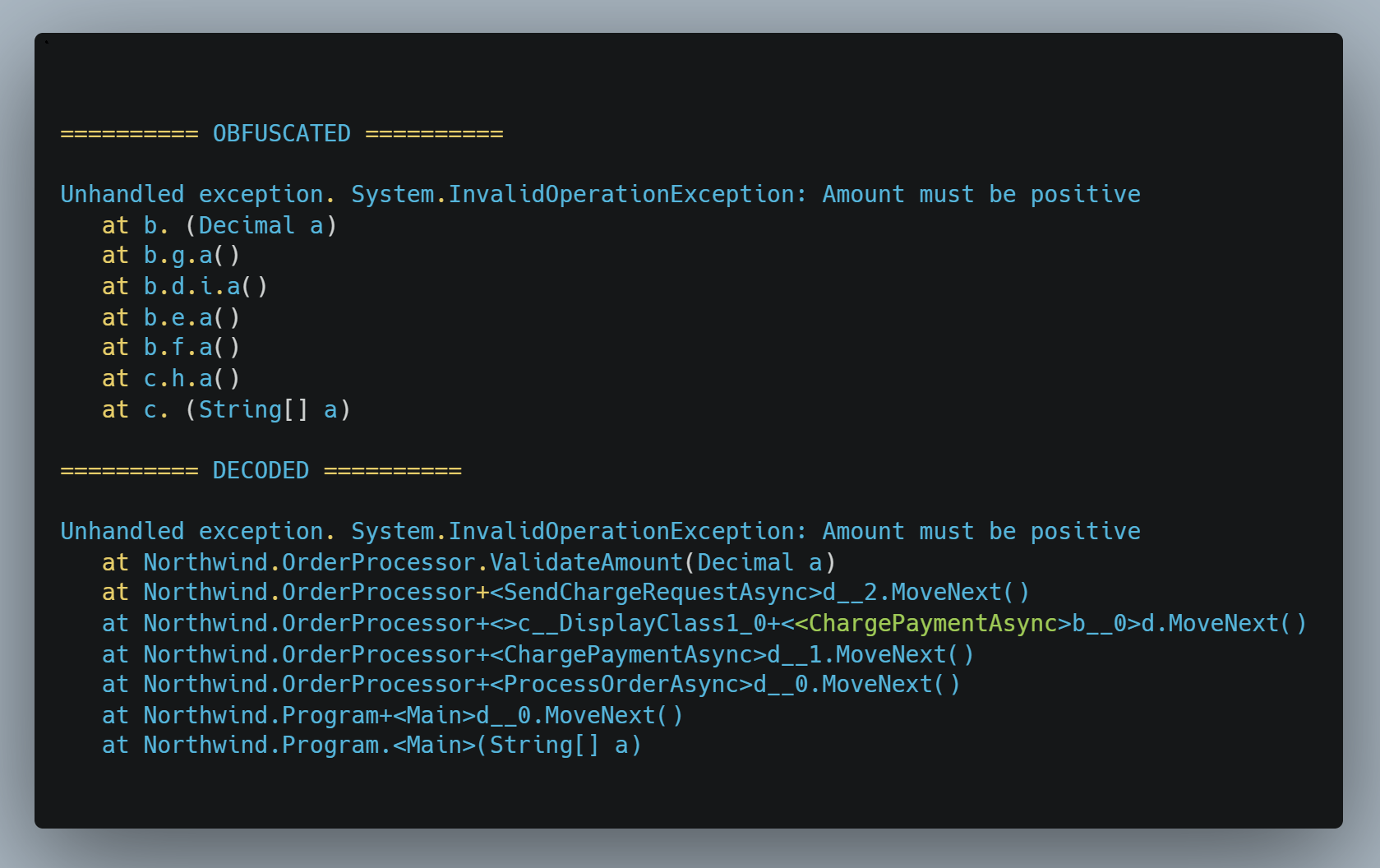
demeanor_deobfuscate_stacktrace recovers every frame (bottom). Captured verbatim during the sample session described below.Total elapsed time
9 minutes 50 seconds on the same hardware. Six steps: build, obfuscate, run, capture, deobfuscate, summarise. Slightly faster than the obfuscation comparison above because the model didn’t have to read two report files in full — the deobfuscator MCP tool ingests the report internally.
Tool calls the model made
execute_command:dotnet build Northwind.csproj -c Release→ build succeeds in 0.8 s.demeanor_obfuscatewithinclude_publics=true→ 13/13 types renamed. Output file list confirms the auto-copy:Northwind.deps.jsonandNorthwind.runtimeconfig.jsonappear alongsideNorthwind.dll.execute_command:dotnet execagainst the obfuscated DLL. App throws as designed; non-zero exit code; trace captured from stderr.demeanor_deobfuscate_stacktracewith the captured trace and the report file path.
The obfuscated crash trace
Captured verbatim from the obfuscated app’s stderr in step 3:
Unhandled exception. System.InvalidOperationException: Amount must be positive
   at b. (Decimal a)
   at b.g.a()
--- End of stack trace from previous location ---
   at b.d.i.a()
--- End of stack trace from previous location ---
   at b.e.a()
--- End of stack trace from previous location ---
   at b.f.a()
--- End of stack trace from previous location ---
   at c.h.a()
--- End of stack trace from previous location ---
   at c. (String[] a)
Every identifier in this trace is post-rename. Type names are single letters. Method names are either a single letter or a literal space (the Enterprise-tier privatescope-name convention). The exception type and message survive unchanged because they’re strings inside the BCL, not symbols Demeanor renamed.
The deobfuscated trace
demeanor_deobfuscate_stacktrace returned this verbatim from the same MCP server:
Unhandled exception. System.InvalidOperationException: Amount must be positive
   at Northwind.OrderProcessor.ValidateAmount(Decimal a)
   at Northwind.OrderProcessor+<SendChargeRequestAsync>d__2.MoveNext()
--- End of stack trace from previous location ---
   at Northwind.OrderProcessor+<>c__DisplayClass1_0+<<ChargePaymentAsync>b__0>d.MoveNext()
--- End of stack trace from previous location ---
   at Northwind.OrderProcessor+<ChargePaymentAsync>d__1.MoveNext()
--- End of stack trace from previous location ---
   at Northwind.OrderProcessor+<ProcessOrderAsync>d__0.MoveNext()
--- End of stack trace from previous location ---
   at Northwind.Program+<Main>d__0.MoveNext()
--- End of stack trace from previous location ---
   at Northwind.Program.<Main>(String[] a)
Every frame is back to its compiler-emitted form: the throwing method (Northwind.OrderProcessor.ValidateAmount), the async state machines for SendChargeRequestAsync, ChargePaymentAsync, ProcessOrderAsync, and Main, the lambda body inside the closure (<>c__DisplayClass1_0+<<ChargePaymentAsync>b__0>d.MoveNext()), and the synthetic <Main> entry-point wrapper at the bottom.
What the model got right, what it didn’t
- Right: tool call sequence, identification of
ValidateAmountas the thrower, and the existence of an async-method call chain leading to it. The deobfuscated trace itself is fully correct — the model’s job there was just to pass the captured stderr text and report path to the MCP tool; the tool did the rename-map lookup. - Imperfect: the model’s prose summary partially mis-attributed the state-machine relationships, claiming “SendChargeRequestAsync implements ChargePaymentAsync’s async workflow” (each state-machine type is its own async method’s body, not another method’s) and “ChargePaymentAsync is the outermost async method” (the outermost is actually
Main). A reader who wants accurate state-machine commentary should either ignore the prose and read the trace bottom-up, or use a stronger model for the synthesis step. The MCP tool’s output — the recovered trace itself — is unaffected by these prose-level slips. - Occasional misfires: the model again tried
demeanor_obfuscate --assembly ...as a shell command before falling back to the MCP tool. Same pattern as the obfuscation session; same one-retry-and-done resolution.
Why the auto-copy mattered
The dotnet exec command in step 3 is a single invocation pointing entirely at files inside Obfuscated-App/. There’s no staging step copying .deps.json and .runtimeconfig.json from bin/Release/ into the obfuscated output directory. The obfuscator did that automatically as part of step 2. Without that behaviour the same command would silently load the ORIGINAL Northwind.dll from bin/Release/ (the .NET host uses the deps.json directory as its primary assembly probing path) — producing an unobfuscated trace and breaking the test in a confusing way.
Hardware reference for the timing numbers
| Component | Spec |
|---|---|
| OS | Windows 11 Pro |
| CPU | Intel Core i9-13900K (24 cores / 32 threads) |
| RAM | 128 GB |
| GPU | NVIDIA RTX 5090 (32 GB VRAM) |
| Driver | NVIDIA 591.86 |
| Model | qwen3:32b with custom 64K-context variant via Modelfile |
Slower hardware will run proportionally slower — the dominant cost is per-token generation on the GPU. A 4090 (24 GB) will run the same workload at roughly the same speed; cards below 24 GB will need a smaller quantisation or context window. CPU and system RAM are not load-bearing once the model is resident in VRAM.
Troubleshooting
“MCP error -32000: Connection closed”
Almost always missing DEMEANOR_LICENSE in the env block, or the wrong command path so the server never starts. Verify:
- The
env.DEMEANOR_LICENSEincline_mcp_settings.jsoncontains a real Enterprise license, not a placeholder. - The
commandiscmd.exewithargsstarting with/c, not justdemeanor. - Running
demeanor --versionin a fresh PowerShell window reports a version number. If it errors, the tool itself isn’t installed properly.
Cline strips its inherited environment when spawning the server. The license can’t reach the server through your shell’s env — only through the env block on the server entry.
“Invalid MCP settings format”
JSON parse error in cline_mcp_settings.json. Check trailing commas, missing braces, and quoting around your license key (which may contain characters that need to be JSON-escaped). Some Cline builds require "type": "stdio" on each server entry — the snippet above already includes it.
Model dumps raw JSON instead of explaining
Tighten the prompt. Add “do not paste JSON” and “use these headings” with explicit names. Local models default to copy-the-input-to-the-output behaviour when the request is open-ended; the constraint not to paste JSON is the one that flips them into synthesis mode.
Model uses inspect_diff when you wanted it to read the report
Explicitly forbid inspect_* tools in the prompt, and name the report file path. The walkthrough prompt above does both.
Model hallucinates a file name with a dot
The default report file name is <asm-base>Report.json — one word, no dot before “Report”. Local models sometimes “normalise” it to <asm-base>.report.json in their narration. Paste the exact path in your prompt and tell the model not to invent file names.
First tool call is slow
Expected. The model loads ~20 GB into VRAM the first time, which takes 30–60 seconds on a 5090. Subsequent calls are fast. If the warm-up exceeds two minutes, check ollama ps — if the model isn’t loaded after that long, it may be spilling to system RAM.
What to expect, honestly
- Expect roughly 10× the wall-clock time of a hosted frontier model. The sample session on a 5090 took 10 minutes for a workflow Claude Sonnet completes in roughly one minute. The dominant cost is per-token generation as the model digests tool-call responses. Bigger reports and longer conversations get proportionally slower.
- Local 32B models are weaker than Claude at multi-step tool orchestration. Tighter prompts produce reliable results; open-ended exploration does not. The walkthrough prompt above is calibrated for this.
- Temperature must stay low. 0.1 or below for reliable tool-call JSON. Higher temperatures break the protocol.
- The MCP surface is Enterprise-tier. The handshake succeeds at any tier — you can call
demeanor_helpunlicensed — butdemeanor_obfuscate, the rule-management tools, and the cooperative-decision loop all require a valid Enterprise license at call time. Without one, those tools return an actionable error string naming the env-passthrough mechanism. - This is not a CI replacement. Production obfuscation should still run through the standard
demeanor obfuscateCLI or the<Obfuscate>true</Obfuscate>MSBuild property. The local-LLM setup is for interactive exploration, audit-and-judge sessions, crash-trace decoding, and ad-hoc rule authoring — the same workflows that customers run through Claude Code, just on hardware they own.
Related
- Decoding stack traces — the conversational crash-decoding workflow. Works the same way with a local model.
- Conversational walkthrough — the canonical Claude Code flow, for comparison.
- CLI Reference — the non-conversational path. Use this for CI and scripted invocation.
- MSBuild Reference — the canonical build-time obfuscation surface.
- Licensing — tier overview; the MCP surface is Enterprise.