Decoding production stack traces
Your obfuscated app crashes in production. The exception logs identifiers like b. (Decimal a) and b.d.i.a() — useless for debugging. Demeanor’s deobfuscate command takes that trace plus the JSON report you emitted at build time and gives you back the original method names. Two forms: from a file, or piped on stdin.
The short version. Tell Demeanor to emit a JSON report at obfuscation time and keep one per release. When a crash arrives, run demeanor deobfuscate crash.txt --report MyApp.report.json. You get back a trace in your source-code identifiers — every recovered name is the verbatim compiler-emitted form (what an unobfuscated build would have printed), with candidate sets shown explicitly when one obfuscated name maps back to several originals. Runs locally. No source code consulted. No network call.
The problem — and what Demeanor gives back
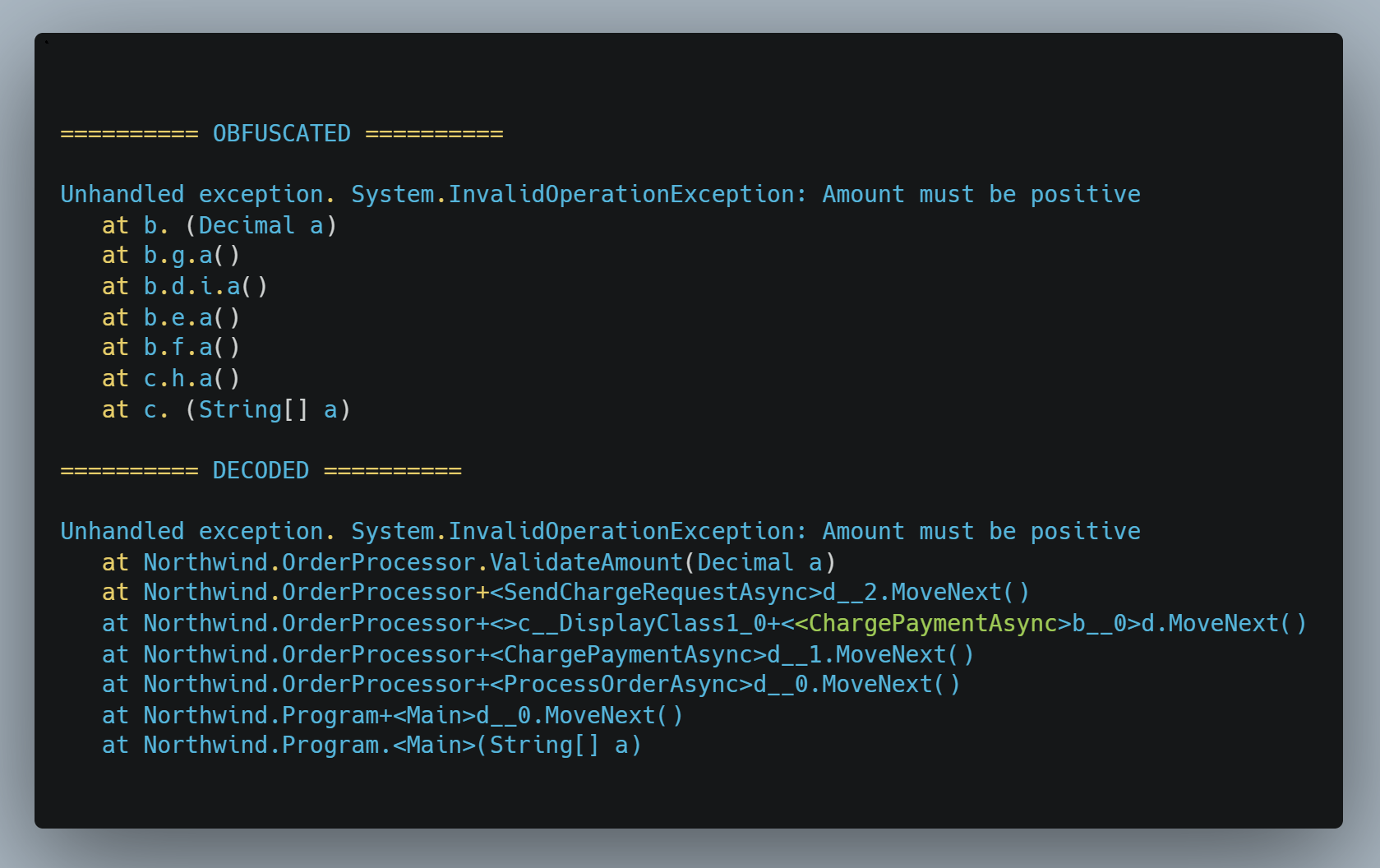
demeanor deobfuscate against the build’s rename-map report (bottom). Both halves captured verbatim from a real Demeanor build.A .NET app obfuscated with Demeanor ships to production. Months later it crashes in a customer environment. The exception logged to disk — or sent to your error-collection service — looks like this:
Unhandled exception. System.InvalidOperationException: Amount must be positive
   at b. (Decimal a)
   at b.g.a()
--- End of stack trace from previous location ---
   at b.d.i.a()
--- End of stack trace from previous location ---
   at b.e.a()
--- End of stack trace from previous location ---
   at b.f.a()
--- End of stack trace from previous location ---
   at c.h.a()
--- End of stack trace from previous location ---
   at c. (String[] a)
Every name is post-rename. Single letters are renamed types; single spaces are renamed methods. The --- End of stack trace from previous location --- lines are the runtime’s own async-hop separators — part of the captured trace, not commentary. A developer cannot debug this.
What Demeanor gives back
Pipe that same trace through demeanor deobfuscate with the JSON report Demeanor emitted alongside the obfuscated assembly at build time, and you get this:
Unhandled exception. System.InvalidOperationException: Amount must be positive
   at Northwind.OrderProcessor.ValidateAmount(Decimal a)
   at Northwind.OrderProcessor+<SendChargeRequestAsync>d__2.MoveNext()
--- End of stack trace from previous location ---
   at Northwind.OrderProcessor+<>c__DisplayClass1_0+<<ChargePaymentAsync>b__0>d.MoveNext()
--- End of stack trace from previous location ---
   at Northwind.OrderProcessor+<ChargePaymentAsync>d__1.MoveNext()
--- End of stack trace from previous location ---
   at Northwind.OrderProcessor+<ProcessOrderAsync>d__0.MoveNext()
--- End of stack trace from previous location ---
   at Northwind.Program+<Main>d__0.MoveNext()
--- End of stack trace from previous location ---
   at Northwind.Program.<Main>(String[] a)
Every frame in source-code terms — the method that threw, the async state machines that led to it, the lambda body inside one of them, and the entry-point chain. The same tool runs at every license tier, including unlicensed and including expired licenses. No source code consulted. No network call. The report is the only input.
The rest of this guide is the mechanics: how to emit the report at build time, the two CLI forms, the same example walked frame-by-frame with the source code in view, the shapes Demeanor recovers automatically, how ambiguity is surfaced when one obfuscated name maps back to several originals, and the optional AI-assisted variant for customers who already use an MCP-capable assistant.
The one input you need — the report
Demeanor’s obfuscator can emit a JSON report alongside the obfuscated assembly. The report records every rename, the call graph, and the per-method signatures the deobfuscator uses for disambiguation. A typical report for a mid-size application is one to five megabytes.
Keep one report per release. Without the report you cannot deobfuscate. With it, deobfuscation takes seconds.
Emitting the report from the CLI
demeanor MyApp.dll --report MyApp.report.jsonThe --report option optionally takes a filename. Pass a path to set the output filename, or omit it (--report alone) to write to a default path next to the obfuscated assembly.
Emitting the report from MSBuild
<PropertyGroup>
  <DemeanorReport>true</DemeanorReport>
  <DemeanorReportFile>$(TargetDir)$(TargetName).report.json</DemeanorReportFile>
</PropertyGroup>
Demeanor’s default MSBuild integration runs obfuscation on Release builds and emits the report whenever obfuscation runs; explicitly set <DemeanorReportFile> if you want a stable path other than the default.
See Reports & Incremental for the report schema, exclusion-reason taxonomy, and incremental-build workflow.
Quick start — CLI
Two forms, depending on how the crash trace is delivered to you. Both are CLI subcommands — they run at every license tier, including unlicensed and including expired licenses. Your customers, your support engineers, and anyone you hand the report file to can decode crash dumps without ever activating Demeanor. The AI-assisted variant covered below is a separate, Enterprise-only surface.
1. Stack trace in a file
demeanor deobfuscate crash.txt --report MyApp.report.jsonOutput goes to stdout. Redirect to a file if you want a permanent copy:
demeanor deobfuscate crash.txt --report MyApp.report.json > crash-decoded.txt2. Stack trace piped from stdin
If your crash arrives from a log-tailing pipeline, pipe directly. Omitting the file argument tells the tool to read from stdin.
# bash / zsh
cat crash.log | demeanor deobfuscate --report MyApp.report.json

# Windows cmd
type crash.log | demeanor deobfuscate --report MyApp.report.json

# PowerShell
Get-Content crash.log | demeanor deobfuscate --report MyApp.report.json
Exit codes
| Code | Meaning |
|---|---|
0 | Deobfuscation succeeded; output written to stdout |
1 | An error occurred (report file missing, invalid input, etc.) |
The deobfuscator does not fail when a frame can’t be resolved — unresolvable frames pass through verbatim so the rest of the trace stays readable.
Worked example — before and after
Same trace as the lede, now with the source code in view and the obfuscated frames annotated row by row. A synthetic ordering service with five methods on OrderProcessor (one of which throws) plus an async Task Main entry point on Program.
Your source
namespace Northwind;

public class OrderProcessor
{
    public async Task ProcessOrderAsync(string orderId)
    {
        var order = await FetchOrderAsync(orderId);
        await ChargePaymentAsync(order);
    }

    private async Task ChargePaymentAsync(Order order)
    {
        Func<Task> attemptCharge = async () =>
        {
            await SendChargeRequestAsync(order);
        };
        await attemptCharge();
    }

    private async Task SendChargeRequestAsync(Order order)
    {
        ValidateAmount(order.Amount);
        // ... talks to payment gateway
    }

    private void ValidateAmount(decimal amount)
    {
        if (amount <= 0)
            throw new InvalidOperationException("Amount must be positive");
    }
}

public static class Program
{
    public static async Task Main(string[] args)
    {
        var processor = new OrderProcessor();
        await processor.ProcessOrderAsync("ORD-1234");
    }
}
The crash trace your customer sends you
Unhandled exception. System.InvalidOperationException: Amount must be positive
   at b. (Decimal a)
   at b.g.a()
--- End of stack trace from previous location ---
   at b.d.i.a()
--- End of stack trace from previous location ---
   at b.e.a()
--- End of stack trace from previous location ---
   at b.f.a()
--- End of stack trace from previous location ---
   at c.h.a()
--- End of stack trace from previous location ---
   at c. (String[] a)
Annotated:
| # | Obfuscated frame | What it is |
|---|---|---|
| 1 | b. (Decimal a) | A private method renamed to literal whitespace on a type renamed to b. Signature matching plus call-graph propagation disambiguate among private-method candidates. |
| 2 | b.g.a() | The async state machine for a private user method. g is the renamed state-machine type; a is the renamed MoveNext (renamed via the MethodImpl bridge to IAsyncStateMachine.MoveNext). |
| 3 | b.d.i.a() | The state machine for an async lambda body. d is the renamed capturing-closure type; i is the renamed inner async-lambda state machine; a is its renamed MoveNext. |
| 4 | b.e.a() | Another async user method’s state machine. |
| 5 | b.f.a() | Another async user method’s state machine. |
| 6 | c.h.a() | The state machine for the user Main method. async Task Main produces its own state machine like any other async method. |
| 7 | c. (String[] a) | The synthetic <Main>$ entry-point wrapper, renamed to literal whitespace. The CLR locates the entry point via the CLI header’s entry-point token, not by name, so renaming both wrapper and user Main is safe. |
Run it
demeanor deobfuscate crash.txt --report Northwind.report.jsonWhat you get back
Unhandled exception. System.InvalidOperationException: Amount must be positive
   at Northwind.OrderProcessor.ValidateAmount(Decimal a)
   at Northwind.OrderProcessor+<SendChargeRequestAsync>d__2.MoveNext()
--- End of stack trace from previous location ---
   at Northwind.OrderProcessor+<>c__DisplayClass1_0+<<ChargePaymentAsync>b__0>d.MoveNext()
--- End of stack trace from previous location ---
   at Northwind.OrderProcessor+<ChargePaymentAsync>d__1.MoveNext()
--- End of stack trace from previous location ---
   at Northwind.OrderProcessor+<ProcessOrderAsync>d__0.MoveNext()
--- End of stack trace from previous location ---
   at Northwind.Program+<Main>d__0.MoveNext()
--- End of stack trace from previous location ---
   at Northwind.Program.<Main>(String[] a)
Each frame is the recovered original name verbatim — what the C# compiler emitted and what the runtime actually invoked. The async state-machine frames keep their <UserMethod>d__N.MoveNext() shape; lambda body frames keep their <>c__DisplayClass<N>_<M>+<<UserMethod>b__<Y>>d.MoveNext() shape. That matches what an unobfuscated .NET build prints before the runtime’s own auto-collapse formatter renders it as UserMethod() in user-facing surfaces. Customers who want the cosmetic collapse can pipe the recovered trace through any standard .NET trace formatter — demeanor deobfuscate deliberately returns the verbatim recovered names so the output matches the runtime-emitted form exactly.
Reading top to bottom:
ValidateAmount(Decimal a)threw.- Called from the state machine for
SendChargeRequestAsync— the async user method whose state machine appeared asb.g.a()in the obfuscated frame. - The state machine for the async lambda body inside
ChargePaymentAsync. The full compiler-emitted form<>c__DisplayClass1_0+<<ChargePaymentAsync>b__0>d.MoveNext()tells you the lambda is the first one (b__0) defined in the second compiler-generated closure (DisplayClass1_0), owned byChargePaymentAsync. This is the high-value translation — the obfuscated frame wasb.d.i.a(); the deobfuscator reads the rename map and reconstructs the verbatim form. - The state machine for the outer
ChargePaymentAsync— the user method that defined the lambda. - The state machine for the caller:
ProcessOrderAsync. - The state machine for user
Main—async Task Mainproduces its own state machine like any other async method. - The synthetic
<Main>$entry-point wrapper. The CLR locates the entry point via the CLI header’s entry-point token, so the runtime invokes the wrapper which kicks the user-Mainstate machine. Frame 7 is the bottom of the call stack.
Two things worth noting in the recovered trace. First, the --- End of stack trace from previous location --- separators between frames are not commentary — they’re what the .NET runtime emits when an async continuation hops thread, and they round-trip through deobfuscation unchanged. Second, the parameter names in the recovered frames stay a rather than the source names amount and args. Parameter renaming is independent of stack-frame deobfuscation; the deobfuscator restores method and type identity but the parameter names you see came out of the obfuscation pass and weren’t in the rename map.
What Demeanor recovers
The deobfuscator handles every compiler-generated stack-frame shape modern .NET produces:
For every recovered frame, the deobfuscator returns the compiler-emitted form verbatim — what an unobfuscated build would have printed, before the runtime’s own auto-collapse formatter renders it as UserMethod() in user-facing surfaces. The obfuscated trace carries fully-renamed identifiers (the state-machine type, the closure type, and MoveNext all rename through the standard pipeline); the deobfuscator reads the rename map and reconstructs the verbatim form from that.
- Sync method frames — direct rename-map lookup; signature matching disambiguates overloads.
- Async and iterator state-machine frames — reconstructed to their compiler-emitted
<UserMethod>d__N.MoveNext()form. The state-machine type and itsMoveNextmethod both rename through the standard pipeline; Demeanor’s report records the relationship between the state-machine type and its owning user method, and the deobfuscator uses that to rebuild the original frame text. - Lambda body frames — reconstructed to
<>c__DisplayClass<N>_<M>.<UserMethod>b__<Y>()(sync lambdas) or with the inner state-machine wrapper (async lambdas). The closure and the lambda body both rename in the obfuscated build; the deobfuscator reconstructs the full nested form so the lambda’s identity within the closure and the user method that defined it are both visible. - Local function frames — reconstructed to the compiler-emitted
<HostMethod>g__LocalName|<N>_<M>shape (or the state-machine variant for async local functions). - Generic method frames — the parameter signature includes the generic parameter; the deobfuscator handles this without special-case logic.
- Nested closures — async lambdas inside async methods, async local functions, lambdas-of-lambdas — reconstructed to their nested compiler-emitted form so the unwind sequence on the call stack is visible exactly as an unobfuscated build would have produced it.
- Cross-assembly frames — frames in BCL or third-party assemblies pass through unchanged. Demeanor never renamed them, so they’re already readable.
- Mixed traces — a stack with some obfuscated frames and some BCL frames decodes the obfuscated parts and leaves the BCL parts alone.
What Demeanor preserves rather than decodes
- File-and-line annotations (
in /path/file.cs:line 123) round-trip verbatim if the obfuscated build retained PDBs. - Exception message text passes through unchanged — Demeanor doesn’t try to decode anything inside the message string.
- “End of inner exception stack trace” markers and inner-exception chains preserve their structure.
Ambiguous frames
Some frames in a stack trace can’t be narrowed to one source method on their own — typically when aggressive Enterprise-tier obfuscation has renamed many private methods to identical non-public identifiers. Demeanor uses several disambiguation signals simultaneously across the whole trace (parameter signatures, entry-point anchoring, and the captured call graph among them). When all signals fail to converge on one answer for a particular frame, the renderer surfaces every surviving candidate explicitly:
at Northwind.OrderProcessor.{ApplyTax|ApplyDiscount|RecordAudit}(Decimal amount)The support engineer sees the finite list of possibilities instead of a single confidently-wrong guess. In practice, this notation appears on a small minority of frames in a large trace; the surrounding frames usually pin down which candidate is the real one.
Optional — AI-assisted deobfuscation Enterprise
If you already use an MCP-capable AI assistant (Claude Code, Claude Desktop, Cursor, Windsurf, Continue.dev, or any future MCP client), Demeanor’s opt-in MCP server exposes the deobfuscator as a tool the assistant can call on your behalf. This surface is Enterprise-only on the Demeanor side and also requires your own Claude subscription — not included with Demeanor. The CLI workflow above stays available at every tier, regardless.
What the workflow looks like
- You paste the obfuscated stack trace into the chat and ask the assistant to make sense of it.
- The assistant identifies which report file matches the crash — you can point at it directly, or the assistant can look in the conventional location alongside the binary.
- The assistant runs the deobfuscation locally through the MCP server.
- The assistant reads the deobfuscated trace and explains it in plain English — naming the method that threw, walking through the call chain, flagging the framework patterns that the async and lambda frames correspond to.
You don’t have to mentally translate “MoveNext on a state machine” into “the async method’s body” — the assistant does that for you.
Privacy
The deobfuscator runs entirely locally. No network calls during deobfuscation. The stack trace text and the report file stay on your machine. For the AI workflow, whatever you paste into chat is governed by your AI provider’s existing subscription terms; Demeanor itself adds no network layer.
Customers who want to deobfuscate without their AI provider seeing the stack trace use the CLI directly — no subscription required, no network round-trip.
Operational guidance
Name reports by version
Always include the assembly version in the report file name:
MyApp.6.2.1.report.json
MyApp.6.2.2.report.json
A six-month-old crash decoded against a newer build’s report will silently produce wrong answers — names that aren’t in the current map fall through to identity. Pin the report to the exact build that produced the crash.
Archive one report per release, indefinitely
Reports are the only artifact tying an obfuscated binary to its source identifiers. If you discard a release’s report you can never decode crashes from that release. Treat reports like PDB files: one per release, kept in the same artifact store you use for symbols.
CI/CD: emit, publish, restore
A typical Azure DevOps pipeline:
- script: |
    demeanor $(buildOutputPath)/MyApp.dll \
      --report $(buildOutputPath)/MyApp.$(version).report.json
  displayName: Obfuscate

- task: PublishPipelineArtifact@1
  inputs:
    targetPath: $(buildOutputPath)/MyApp.$(version).report.json
    artifactName: deobfuscation-report
Then in your support workflow:
- task: DownloadPipelineArtifact@2
  inputs:
    artifactName: deobfuscation-report
    targetPath: $(reportPath)

- script: demeanor deobfuscate $(crashFile) --report $(reportPath)/MyApp.$(crashVersion).report.json
  displayName: Decode crash trace
Integrating with error-collection pipelines
Because demeanor deobfuscate reads from stdin and writes to stdout, it slots into automated pipelines easily. Pipe the raw crash text in, capture the decoded text on the other side, and store it next to the original report:
cat raw-crash.txt | demeanor deobfuscate --report MyApp.6.2.1.report.json > decoded-crash.txtCross-version compatibility
One report per release. Names rotate across releases by default — even when source didn’t change, a fresh obfuscation may pick different short names. If you want names to stay stable across releases (useful for cross-version serialization, plugin contracts, or smaller binary diffs), use incremental obfuscation. Without it, treat reports as build-specific.
Common questions
Do I need to obfuscate with --report for deobfuscation to work?
Yes. The report is the only source of truth for the rename map. Without it, the deobfuscator has nothing to look names up in.
Can I deobfuscate a stack trace from a build I don’t have the report for?
No. The names in the obfuscated trace are produced by the obfuscation pass, but only the report records which original maps to which obfuscated name for that specific build. Different builds produce different maps.
Does the deobfuscator require an internet connection?
No. Everything runs locally.
Does it work with stack traces from .NET Framework, .NET Core, .NET 5+?
Yes. The frame syntax is consistent across .NET versions for the shapes Demeanor obfuscates. Async and state-machine handling targets the C# compiler’s naming conventions, which haven’t changed in any meaningful way since C# 5.
What about iterator methods (yield return)?
Iterators produce state machines exactly the same way async does — <UserMethod>d__N types with MoveNext methods. Same recovery path applies.
What about Native AOT builds?
Supported. Reports are produced at obfuscation time, before AOT compilation. The deobfuscator consumes the report the same way regardless of whether the shipping binary was AOT-compiled or JIT-compiled.
What if my crash trace contains async frames from a library I don’t own?
They pass through unchanged. Demeanor only renamed assemblies it processed; library frames aren’t in your report and need no decoding.
Does deobfuscation require my source code?
No. Only the report and the trace. The report contains the rename map; the trace contains the obfuscated identifiers. Source code is not consulted.
Do I need an Enterprise license to deobfuscate?
No, not for the CLI. The deobfuscate subcommand runs at every tier — including unlicensed and including expired licenses. Your customers, your support engineers, and anyone you hand the report file to can decode crash dumps without ever activating Demeanor. (Producing the obfuscated build that emitted the report is Enterprise; reading the report back is open to anyone with the file.)
The AI-assisted variant is different. The MCP server, the /obfuscate skill in Claude Code, and the conversational deobfuscation surface are all Enterprise features. If you don’t have an active Enterprise license, you can still run the CLI exactly as documented above; the AI integration just isn’t exposed.
Next steps
- Reports & Incremental — report schema, exclusion reasons, and incremental-build name stability
- Getting Started — the canonical CLI guide
- Conversational workflow — setup for customers who already use an MCP-capable assistant
- CI/CD Integration — pipeline patterns, secrets, and report archiving